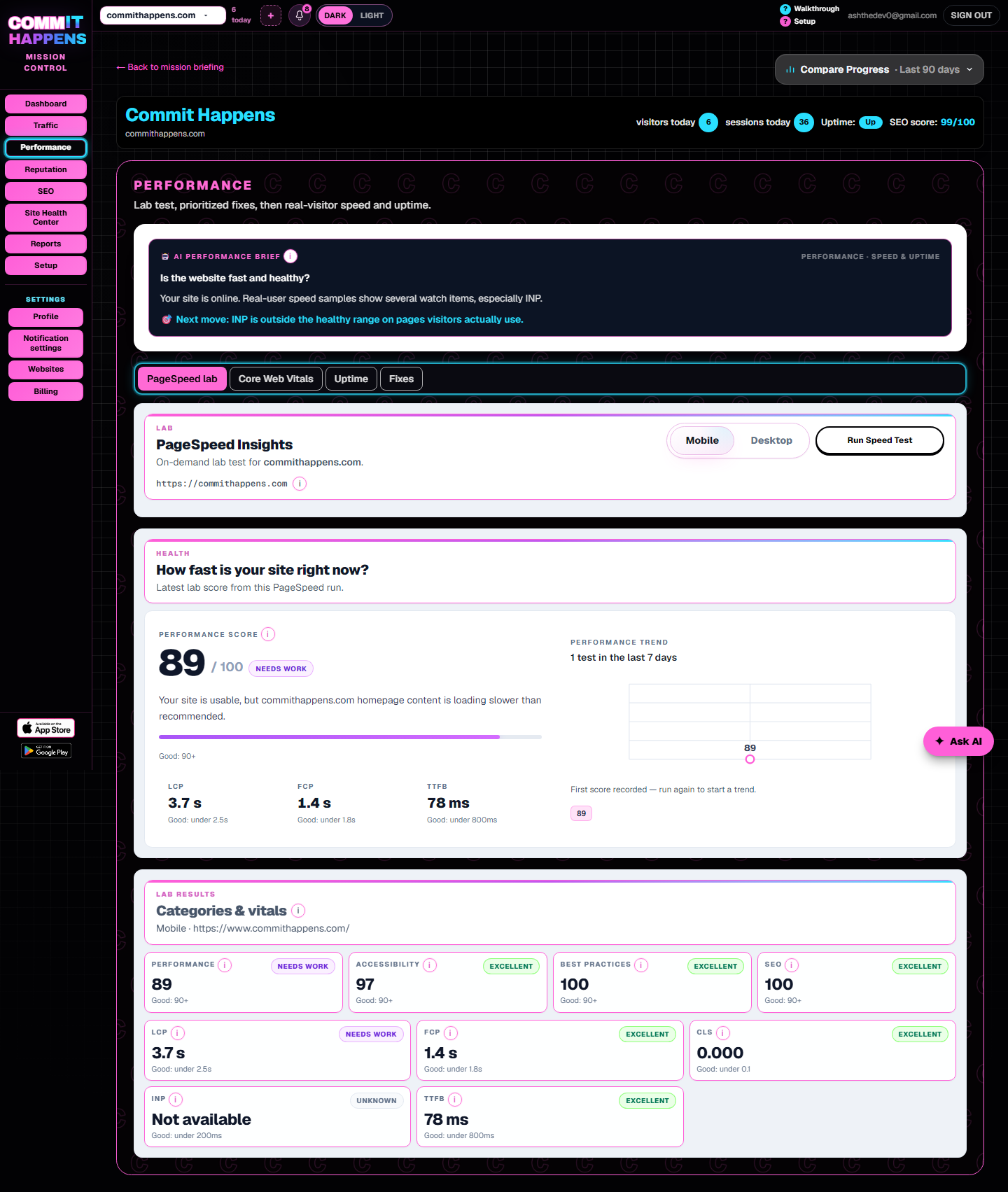

Website performance monitoring

Site Speed Test and Website Performance Monitoring

A site speed test checks how quickly visitors can see and use your page. Commit Happens connects speed signals to business impact, like lost leads and lower engagement.
  • Free scan preview
  • Plain English fixes
  • Plans from $19/mo

Run a site speed test

One free Website Report per day — no account required. Unlock the full report and save it to your dashboard with a free account.

Example output

Example speed test finding

A page can pass uptime checks and still lose visitors on speed.

Example

A page can technically be online but still lose visitors if the hero image takes too long to appear or buttons respond slowly.

Priority

Compress hero media on the homepage before polishing low-traffic archive pages.

Next step

Run a site speed test, then monitor after signup to catch regressions.

Product demo

Watch the quick demo

See how Commit Happens helps you spot traffic, SEO, uptime, and performance issues before they become expensive.
Commit Happens demo preview

2-minute walkthrough

From first scan to ongoing monitoring — see the dashboard, alerts, and fix guidance in action.

Watch demo

What Commit Happens does

One dashboard for website health — not another analytics rabbit hole

Commit Happens monitors uptime, SEO, performance, and traffic, then tells you what to fix first in plain English. Built for owners and small teams who need answers, not a PhD in Search Console.

What problem it solves

Broken pages, slow loads, weak search previews, and quiet traffic drops — surfaced before they cost leads and trust.

Why we're different

Prioritized fixes tied to real URLs. No enterprise maze. No vanity scores without context. Monitoring + scans + explanations in one place.

How to try it

Run a free scan on this page, watch the demo, or compare plans — no homepage detour required.

The problem

Slow sites leak money quietly

Visitors do not file tickets when a page feels sluggish — they leave. A speed test shows which URLs hurt conversions before your bounce rate becomes a personality trait.

Why it matters

What a site speed test should check

A useful speed test goes beyond a single lab score. It should flag how long main content takes to appear, how responsive interactions feel, whether layout shifts annoy readers, and whether the server responds quickly enough on mobile.

Commit Happens highlights LCP, FCP, INP, CLS, TTFB, heavy assets, and mobile experience clues on URLs that actually matter for conversions — homepage, pricing, contact, booking — not abstract benchmarks you forget next week.

Why speed affects sales and trust

  • Visitors leave slow pages before they read your offer.
  • Forms feel broken when interactions lag — fewer people finish signup or contact flows.
  • Slow landing pages weaken paid campaigns because ad spend sends traffic to a sluggish experience.

Performance monitoring vs one-time speed test

A one-time site speed test gives you a snapshot — useful before a launch or after a redesign. Performance monitoring catches regressions when someone adds a heavy hero image, a new plugin, or tracking scripts that slow key pages weeks later.

Use the test to baseline. Use monitoring to make sure fixes stay fixed.

What gets scanned

Coverage in one pass

  • LCP — largest contentful paint on key URLs
  • FCP — how fast something useful appears
  • INP — interaction responsiveness
  • CLS — layout stability
  • TTFB — server response time
  • Heavy images, scripts, and mobile experience clues

What you get

Plain-English results

  • Know which pages frustrate visitors first
  • Prioritize fixes on URLs that actually convert
  • Pair one-time scan results with ongoing monitoring after signup

How Commit Happens helps

Audit snapshots vs ongoing monitoring

One-time audit

A site speed test answers how fast your pages feel right now — LCP, INP, TTFB, and heavy assets on money URLs.

Ongoing monitoring

Performance monitoring watches those signals over time and alerts you when a deploy or content change slows conversions again.

Feature breakdown

What a site speed test should check

LCP

How long until the main content visitors care about is visible.

FCP

How quickly the page shows something useful instead of a blank screen.

INP

Whether taps, clicks, and form fields respond without frustrating delay.

CLS

Layout shifts that make buttons jump while people try to click.

TTFB

Server response time — slow backends drag everything else down.

Heavy assets

Oversized images, videos, and scripts that inflate load time.

Mobile experience

Phones are where most local and service traffic arrives — test there first.

Take the next step

Ready to see what's happening on your website?

Run a free scan, watch the demo, or compare plans — every path starts here, not on the homepage.

Want to see it first? Watch the 2-minute demo.

Plans

Plans starting at $19/month

Monitor uptime, performance, SEO, and traffic from one dashboard. Free tier available — upgrade when you need maps, Search Console, scheduled crawls, and AI guidance.

FAQ

Site speed test FAQ

What is a site speed test?

A check of how quickly visitors can see and use your page — especially LCP, FCP, INP, and TTFB on mobile. Commit Happens ties results to real business URLs, not abstract lab scores alone.

What are Core Web Vitals?

Google’s real-user speed signals — especially how fast main content loads (LCP) and how responsive pages feel (INP). Commit Happens highlights watch-range pages on URLs that matter for conversions.

Why does speed affect conversions?

Visitors leave before they read your offer when pages feel sluggish. Slow money pages leak leads even when the server is technically up.

How is this different from uptime monitoring?

Uptime asks whether the site responds. Performance monitoring asks whether it responds fast enough for humans to stay and convert.

Get started

Start monitoring your website before small issues become expensive problems.

Baseline slow pages and heavy assets on a one-time test. Connect monitoring after signup to catch regressions when someone adds a new plugin or hero video.

Measure speed on your money pages before monitoring history kicks in.

One free Website Report per day — no account required. Unlock the full report and save it to your dashboard with a free account.

Related tools

Watch demo · View Pricing