
What problem it solves
Website health checker
Website Health Checker — Run a Live Site Check
- Free URL preview
- Plain English
- Uptime + SEO + speed
Example output
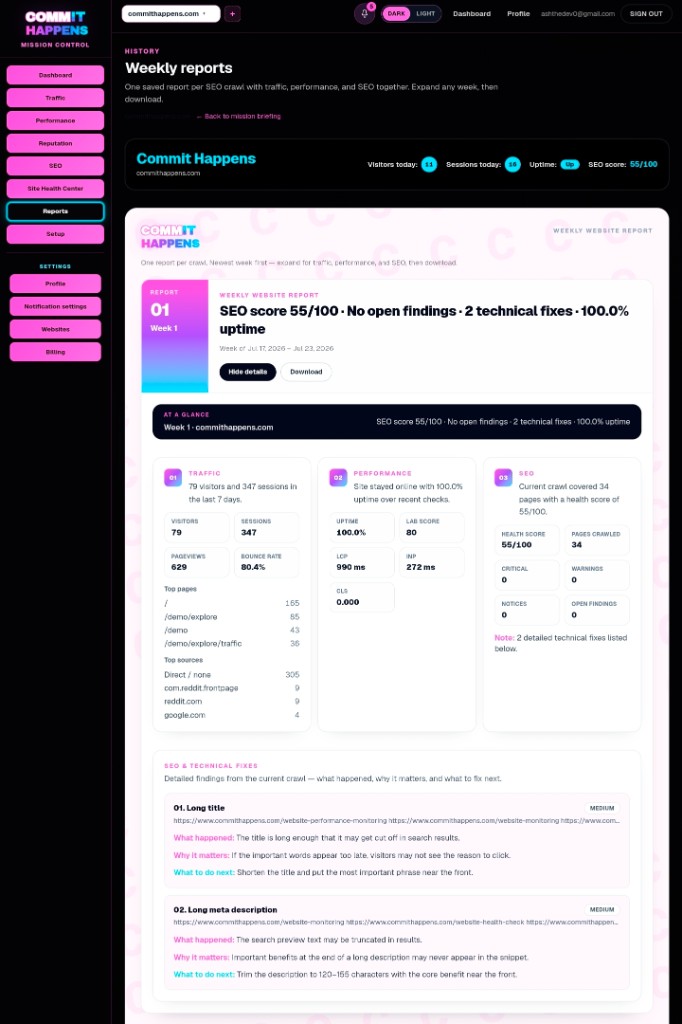
Example website health check
Overall site health
Site is online, but homepage load speed is borderline and several pages have weak search previews. Fixing the homepage first may create more impact than editing low-traffic pages.
Biggest risk
Contact page returned an error in the latest crawl sample.
Priority
Restore contact page, then tighten homepage metadata.
Product demo
Watch the quick demo
What Commit Happens does
One dashboard for website health — not another analytics rabbit hole
Why we're different
How to try it
Warning lights
Your website status at a glance
Green — healthy
Healthy signal
Page is reachable, core checks look stable, and nothing urgent is blocking customers or crawlers.Yellow — watch
Watch signal
Something drifted — slow loads, weak metadata, or slipping traffic worth fixing before it becomes expensive.Red — act now
Urgent signal
Broken pages, downtime risk, or errors on paths customers use to call, book, or buy.Real examples
What each signal looks like in practice
Red — contact page down
Act now
/contact returns 500. Forms fail. Google may struggle to crawl a page that drives leads.Yellow — homepage slow on mobile
Watch
LCP slipped after a hero image update. Site is up — but visitors bounce before they read your offer.Yellow — duplicate titles
Watch
Homepage and /services share the same title tag. Crawlers and searchers cannot tell which page to trust.Green — money pages stable
Healthy
Key URLs respond fast, metadata is clear, and nothing urgent is blocking customers or crawlers.The problem
Unhealthy sites cost trust quietly
Signs Your Website May Have Health Issues
Website health problems rarely arrive with a siren. They show up as softer signals — until a launch, ad spend, or busy season makes them expensive.
If any of these sound familiar, a website health check is worth running before you guess at the cause.
- Traffic suddenly drops on pages that used to perform
- Pages load slowly on mobile, especially your homepage or booking flow
- Search rankings or impressions decline without an obvious reason
- Broken pages appear in reports or customer complaints
- Visitors stop converting even though ads and offers did not change
- The website feels unreliable — intermittent errors, stale content, or odd behavior after updates
Commit Happens connects symptoms to likely causes so you can fix the business impact, not just the metric.
What Does the Website Health Checker Do?
The Commit Happens website health checker is the product-facing scan for ongoing site condition: paste a URL, get a plain-English snapshot of reachability, SEO clarity, performance clues, crawlability, metadata quality, and errors on public pages.
You see expected outputs such as SEO findings, performance signals, uptime concerns, metadata gaps, crawlability issues, and a prioritized list of actions — not a raw export of codes.
It is built for owners who want actionable findings now. For the educational pillar on what site health means, use the website health check guide. For an ordered diagnostic workflow, use the how to check website health checklist. For a deeper point-in-time assessment, use the website audit tool.
- SEO issues — unclear titles, weak snippets, and crawl problems
- Performance problems — slow loads that make visitors leave
- Uptime concerns — pages that fail when customers try to buy or book
- Broken pages — 404s and errors on contact, pricing, or checkout paths
- Crawlability — signals that help search engines understand your site
- Metadata — titles and descriptions that explain each page’s job
- Prioritized actions — what to fix first based on business impact
Run the checker above for a live product scan — or open the website health check guide if you want the full system explained first.
Feature breakdown
What Does Commit Happens Check?
Website monitoring
SEO health
Performance
Uptime
Traffic insights
Technical issues
Change tracking
What Should I Fix First?
When a website has multiple issues, not everything deserves immediate attention. A useful website health checker ranks fixes by business impact so you are not rewriting low-traffic archives while your contact page is down.
Use this simple priority framework after your health check:
- Uptime and availability — restore pages customers need to reach you
- Major performance issues — fix slow money paths before polishing minor pages
- SEO problems — clarify titles, headings, and snippets on URLs that already earn traffic
- User experience issues — reduce confusion, broken flows, and layout instability
- Content improvements — deepen pages after technical blockers are handled
Run a check, follow the priority order, then connect website monitoring so regressions do not hide until the next crisis.
Symptom → cause → fix
When site health looks fine — but results are not
Traffic is down but uptime looks fine
Cause
Slow pages, weak search snippets, or broken conversion paths often hide behind a green status badge
Fix
Health-check performance and SEO together — then fix the highest-traffic URL first
You only hear about problems from customers
Cause
One-off checks miss regressions that happen after deploys or content changes
Fix
Baseline with a website health check, then add website monitoring for ongoing site health
Too many warnings, no clear priority
Cause
Generic tools list everything at once without business context
Fix
Use a health read that ranks fixes by impact on reachability, speed, and search clarity
What gets scanned
Coverage in one pass
- Uptime and reachability
- Speed and Core Web Vitals clues
- SEO basics — titles, descriptions, headings
- Broken pages and server errors
- Homepage and money-page clarity
- Traffic signals when your tracker is connected
What you get
Plain-English results
- A clear read on overall site health
- Prioritized issues owners can act on this week
- Plain-English explanations — not a raw export
- A path to ongoing website health monitoring after signup
Social proof
Why Website Health Matters
Site health is not a vanity score. It is the condition of the place where customers decide whether to trust you, buy from you, or bounce to a competitor.
Ignoring small issues is how teams end up paying for ads that land on slow pages, or ranking for queries that never click because the snippet is vague.
- Customer trust — broken pages and slow loads feel like neglect
- Conversions — healthy sites make it easy to call, book, or buy
- Search visibility — crawlable, clear pages earn more qualified visits
- User experience — stable, fast sites keep people engaged
- Business growth — fixes compound when monitoring catches regressions early
A regular website health check — plus monitoring — turns website health from a mystery into a manageable habit.
How Commit Happens helps
Audit snapshots vs ongoing monitoring
One-time audit
Ongoing monitoring
Take the next step
Ready to see what's happening on your website?
Want to see it first? Watch the 2-minute demo.
Plans
Plans starting at $19/month
Monitor uptime, performance, SEO, and traffic from one dashboard. Free tier available — upgrade when you need maps, Search Console, scheduled crawls, and AI guidance.
Issue deep dives
Learn what the scan is yelling about
FAQ
Website health checker FAQ
What is a website health check?
A website health check evaluates reachability, speed, SEO clarity, errors, and visitor experience on your key URLs. This page is the Commit Happens checker for a live scan; the website health check guide explains the full system, and the how to check website health page walks the diagnostic order.
How do I check my website health?
Enter your domain in the checker above for a product scan, or follow the step-by-step how to check website health checklist if you want the full diagnostic order including Search Console.
What affects website health?
Uptime, page speed, broken URLs, metadata quality, crawlability, mobile usability, traffic trends, and regressions after deploys all affect site health. A good checker surfaces the mix, not just one number.
Why is website health important?
Unhealthy sites lose trust, conversions, and search visibility long before they show up as downtime. Regular checks help you fix small problems before they become revenue leaks.
How often should I check my website health?
Run a full health check before launches, redesigns, or paid campaigns. For active sites, monthly checks plus ongoing website health monitoring catch regressions between manual reviews. Pair the checker with the website health check guide when you need the broader pipeline explained.
Can website monitoring improve website health?
Monitoring does not fix issues by itself — but it alerts you when uptime, SEO, or performance drifts so you can act before customers notice. Pair checks with monitoring for the best results.
What is the difference between a health checker and a website audit tool?
A health checker focuses on ongoing condition and monitoring. A website audit tool is a deeper point-in-time assessment with prioritized findings — useful before launches and redesigns.
What are the most common website health issues?
Slow mobile loads, broken contact or booking pages, missing or duplicate meta descriptions, unclear headings, server errors, and SEO regressions after content changes are among the most common findings.
Get started
Start monitoring your website before small issues become expensive problems.
Related tools